Flowcall
Examples / Decisions
A decision that checks itself
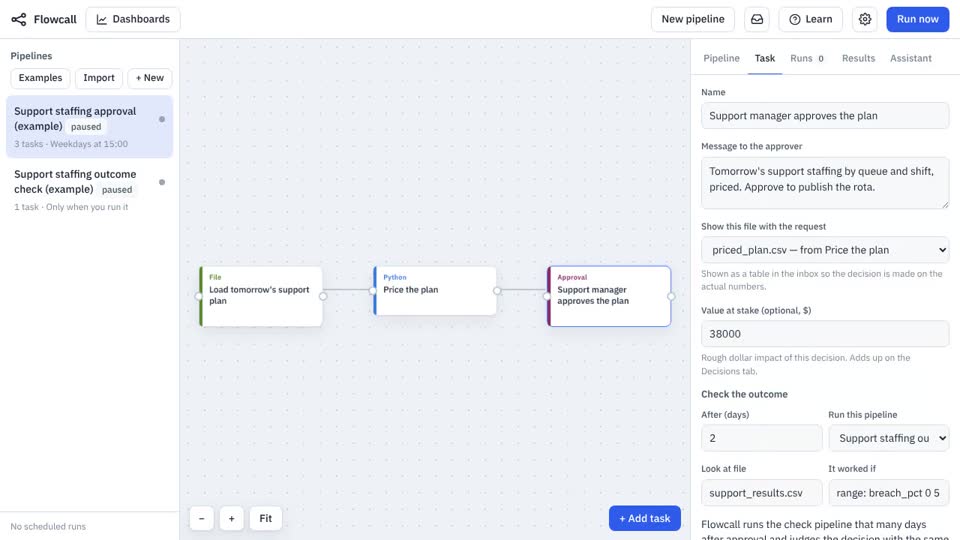
Approve tomorrow's support staffing plan with its dollar value, then let Flowcall check two days later whether SLA breaches stayed under 5%. Installs two pipelines already wired together: the plan and the outcome check.
What it teaches
- Approval with value
- Outcome checks
- Hit rate
- Cost per decision
- Receipts
Try it
- In Flowcall, open Learn and choose Examples.
- Install A decision that checks itself.
- Press Run now and open the Results tab.
Learn more
- 2. Give a decision a value and an outcome in the Decisions guide
- 3. Hit rate and cost per decision in the Decisions guide
- 4. Receipts for audits and reviews in the Decisions guide
The steps
- Load tomorrow's support plan Move a file
Brings
support_plan.csvinto the run. - Price the plan Python
- Support manager approves the plan Approval
Asks: “Tomorrow's support staffing by queue and shift, priced. Approve to publish the rota.” Value at stake: $38,000.
It also installs a second pipeline, Support staffing outcome check, which checks the outcome later.
What it looks like