Flowcall
Examples / Data engineering
Daily data quality gate
Load a product usage extract, profile it, and stop the pipeline when the data is wrong — blanks, duplicates, out-of-range values, and a total that drifts from history.
What it teaches
- Quality check rules
- Anomaly detection
- Failure alerts
- Results tab warnings
Try it
- In Flowcall, open Learn and choose Examples.
- Install Daily data quality gate.
- Press Run now and open the Results tab.
Learn more
- 3. Catch the 10,000-instead-of-1,000 mistake in the Analytics guide
- 3. Gates, alerts and what to do at 3 a.m. in the Data engineering guide
The steps
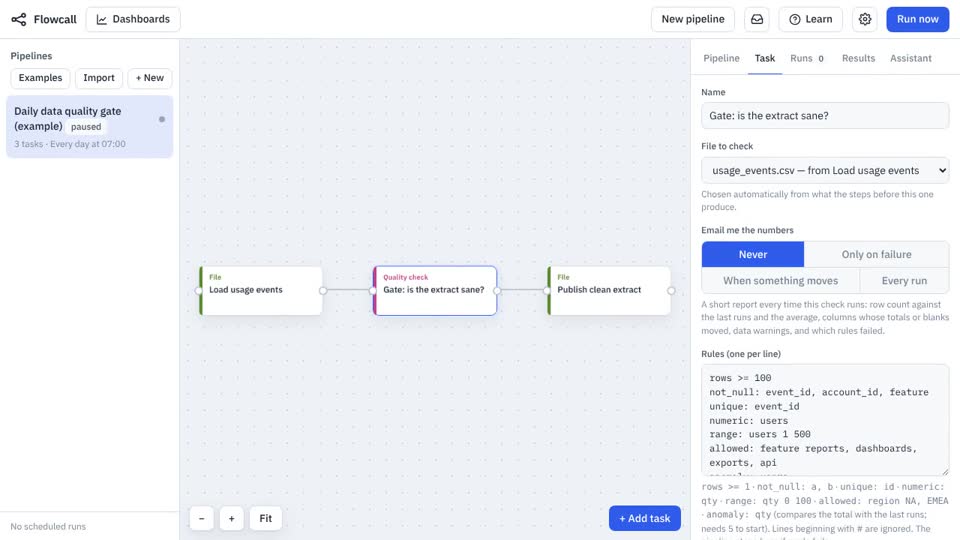
- Load usage events Move a file
Brings
usage_events.csvinto the run. - Gate: is the extract sane? Quality check
rows >= 100 not_null: event_id, account_id, feature unique: event_id numeric: users range: users 1 500 allowed: feature reports, dashboards, exports, api anomaly: users - Publish clean extract Move a file
Saves
usage_events.csvto Files, date-stamped.
What it looks like